Free Figma plugin · v2 · By UX Hero
Code Runner.Run Figma Plugin API code right in your file.
Write or paste JavaScript, press ⌘+Enter, and it runs against the open file. Helpers are already loaded, errors point to your line, and one click copies a prompt that teaches Claude the rules.
- Cost
- Free
- Snippets
- 8
- Network
- None
How it works
Open. Write. Press Run.
No setup, no API keys, no account. The plugin is a small editor for the Figma Plugin API with the boring parts already done.
-
01 · open
Open it in any file
Install it from Figma Community, then run it from the plugins menu. The window is resizable from the corner.
Resources → Plugins → UX Hero: Code Runner -
02 · write
Pick a snippet, write code, or ask Claude
Eight snippets build real components. Or press Copy prompt for Claude, describe the task in Claude and paste the script back.
-
03 · run
Press ⌘+Enter
Ctrl+Enter on Windows. Select a few lines to run only them. Your script autosaves, and each run is one undo step on the canvas.
Code in, components out
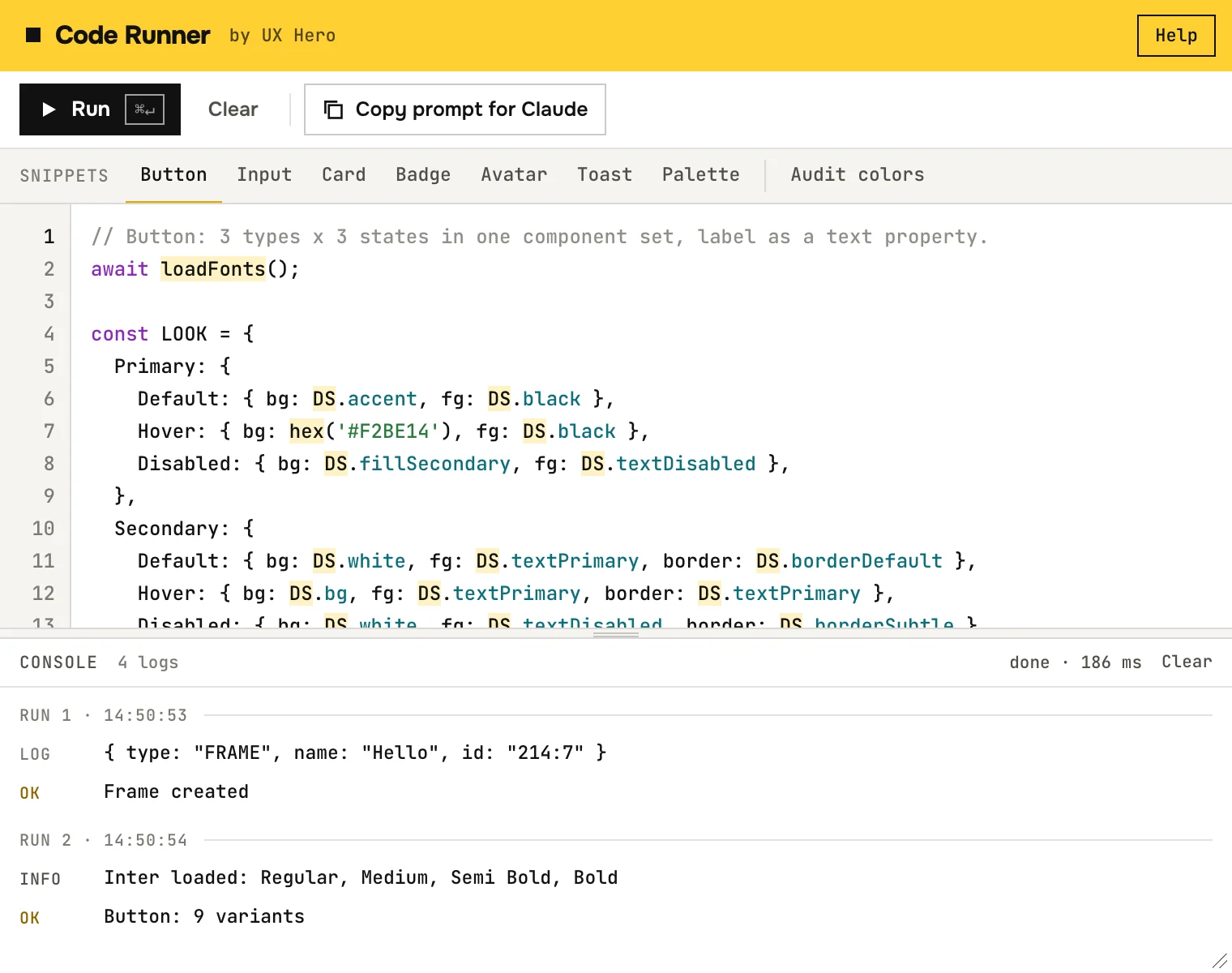
Fourteen lines, one component set.
The helpers take care of auto layout, fonts and variant layout, so the script reads like a description of the component.
1await loadFonts();
2const comps = [];
3for (const type of ['Primary', 'Secondary', 'Ghost']) {
4  const c = makeComponent('Type=' + type, {
5    r: 8, layout: 'HORIZONTAL', px: 20, py: 12,
6    fills: type === 'Primary' ? [solid(DS.accent)] : [],
7    strokes: type === 'Secondary' ? [solid(DS.borderDefault)] : null,
8  });
9  c.appendChild(await makeText(type, 14, DS.black, { style: 'Semibold' }));
10  comps.push(c);
11}
12const set = combineVariants(comps, 'Button');
13console.log(set);
14ok('3 variants');
On the canvas
Pre-loaded helpers
Functions you would write anyway.
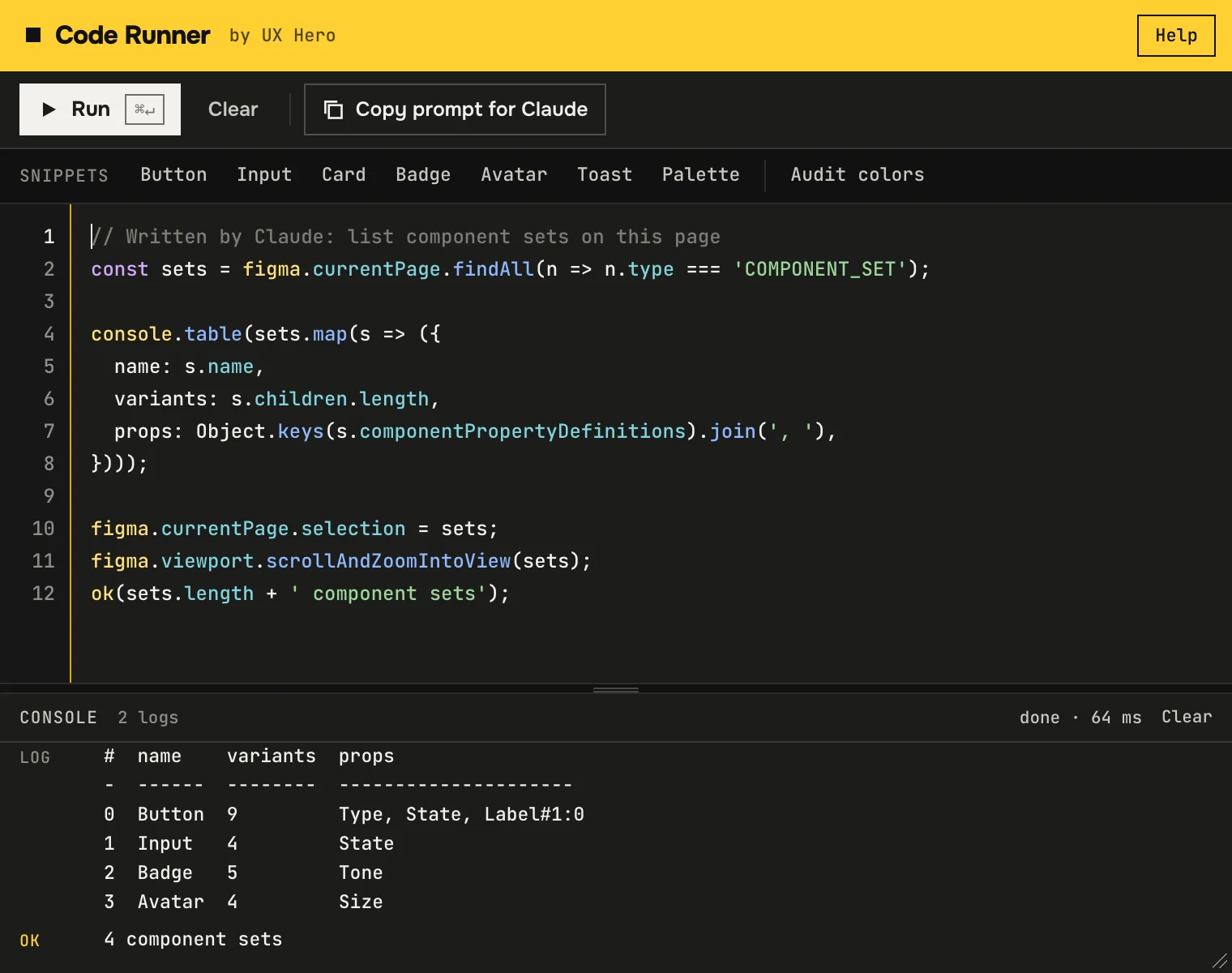
Defined in every run, no imports. Text uses Inter, which every Figma has, so scripts work on Mac, Windows and in the browser. Redefine any helper in your script and yours wins.
| Helper | What it does |
|---|---|
| makeFrame(name, opts) | Frame with auto layout, padding, gap, fills, strokes and radius in one call. |
| makeComponent(name, opts) | Same options, returns a component ready for variants. |
| await makeText(text, size, color, opts) | Text node that loads its own font. Styles Regular, Medium, Semibold, Bold; fixed width, line height, letter spacing. |
| makeRect(opts) | Rectangle with size, radius, fills and strokes. |
| await loadFonts(...styles) · setFont(family) | Loads Inter styles up front. setFont switches the family for everything after it. |
| solid(color, opacity?) · hex('#FFCF33') | A solid paint, and hex to a Figma color. |
| DS.accent · DS.textPrimary · DS.borderDefault ... | A neutral palette to sketch with: accent, text, border, fill, status colors. |
| await v(name)new | Finds a local variable by name. |
| bindFill(node, variable) · bindStroke(...)new | Binds a fill or stroke to that variable instead of a hardcoded color. |
| combineVariants(comps, name) | Component set from "Prop=Value" components, laid out in a grid. |
| ok(msg) · err(msg) · page | Figma toast plus a console line, and a shortcut for the current page. |
Works with Claude
Let Claude write the script.
Claude knows the Figma Plugin API, but not this plugin's helpers or the rules of files that load pages on demand. The prompt covers both, so the first script usually runs.
- 01Copy the prompt
Here, or with the button in the plugin toolbar.
- 02Describe the task in Claude
"Audit this page for text without a text style", "build a pricing card with three tiers".
- 03Paste the script and press ⌘+Enter
If it fails, copy the error line back to Claude.
You are writing a script for the Figma plugin "UX Hero: Code Runner". I will paste your code into its editor and press Run.

How the code runs
- Plain JavaScript. No TypeScript, no imports, no HTML. Reply with one code block only.
- The code runs inside an async function: top-level await works, return stops the script.
- The file uses dynamic page loading. Use only async APIs: figma.getNodeByIdAsync, figma.variables.getLocalVariablesAsync, figma.variables.getLocalVariableCollectionsAsync, figma.variables.getVariableByIdAsync, figma.getLocalPaintStylesAsync, figma.getLocalTextStylesAsync, node.getMainComponentAsync, node.setFillStyleIdAsync, node.setTextStyleIdAsync, figma.setCurrentPageAsync, page.loadAsync. Never use figma.getNodeById, figma.getLocalPaintStyles, instance.mainComponent, "figma.currentPage = ...", "node.fillStyleId = ...".
- Fonts: call await loadFonts() before creating text (Inter Regular, Medium, Semibold, Bold). makeText() loads its own font. Before editing an existing text node, await figma.loadFontAsync for every font it uses (node.getRangeAllFontNames(0, node.characters.length)).
- Colors are { r, g, b } from 0 to 1. Use hex("#RRGGBB") or the DS tokens. Never put "a" inside a paint color, use the paint opacity.
- If the file has variables, bind them instead of raw colors: bindFill(node, await v("color/bg/default")).
- Only touch nodes the task mentions. At the end select and zoom to what you created and call ok("short summary").
- Log useful facts with console.log or console.table. Nodes print as { type, name, id }.

Helpers that already exist (do not redefine them)
- makeFrame(name, opts) and makeComponent(name, opts). opts: { w, h, r, fills, strokes, strokeWeight, layout: "HORIZONTAL" | "VERTICAL", gap, px, py, pl, pr, pt, pb, pAlign, cAlign, pMode: "AUTO" | "FIXED", cMode, clip }
- makeRect(opts). opts: { w, h, r, fills, strokes, strokeWeight, name, grow }
- await makeText(text, size, color, opts). opts: { style: "Regular" | "Medium" | "Semibold" | "Bold", bold, w (fixed width, wraps), lh, ls, align, name, font }
- await loadFonts(...styles), setFont(family)
- solid(color, opacity?), hex("#RRGGBB"), glassFills(disabled?)
- DS tokens: accent, accentDim, error, success, warning, white, black, textPrimary, textSecondary, textDisabled, borderDefault, borderAccent, borderSubtle, fillSecondary, glassOverlay, glassLum, bg
- await v(name) returns a local variable by name. bindFill(node, variable), bindStroke(node, variable, weight?)
- combineVariants(components, name, x?, y?). Name each component "Prop=Value, Prop2=Value". Overlapping components are laid out in a grid.
- ok(message), err(message): a Figma toast plus a console line
- page is figma.currentPage

My task:
Errors and console
Errors point to your line.
Not to a line inside the plugin. Click it and the editor jumps there.
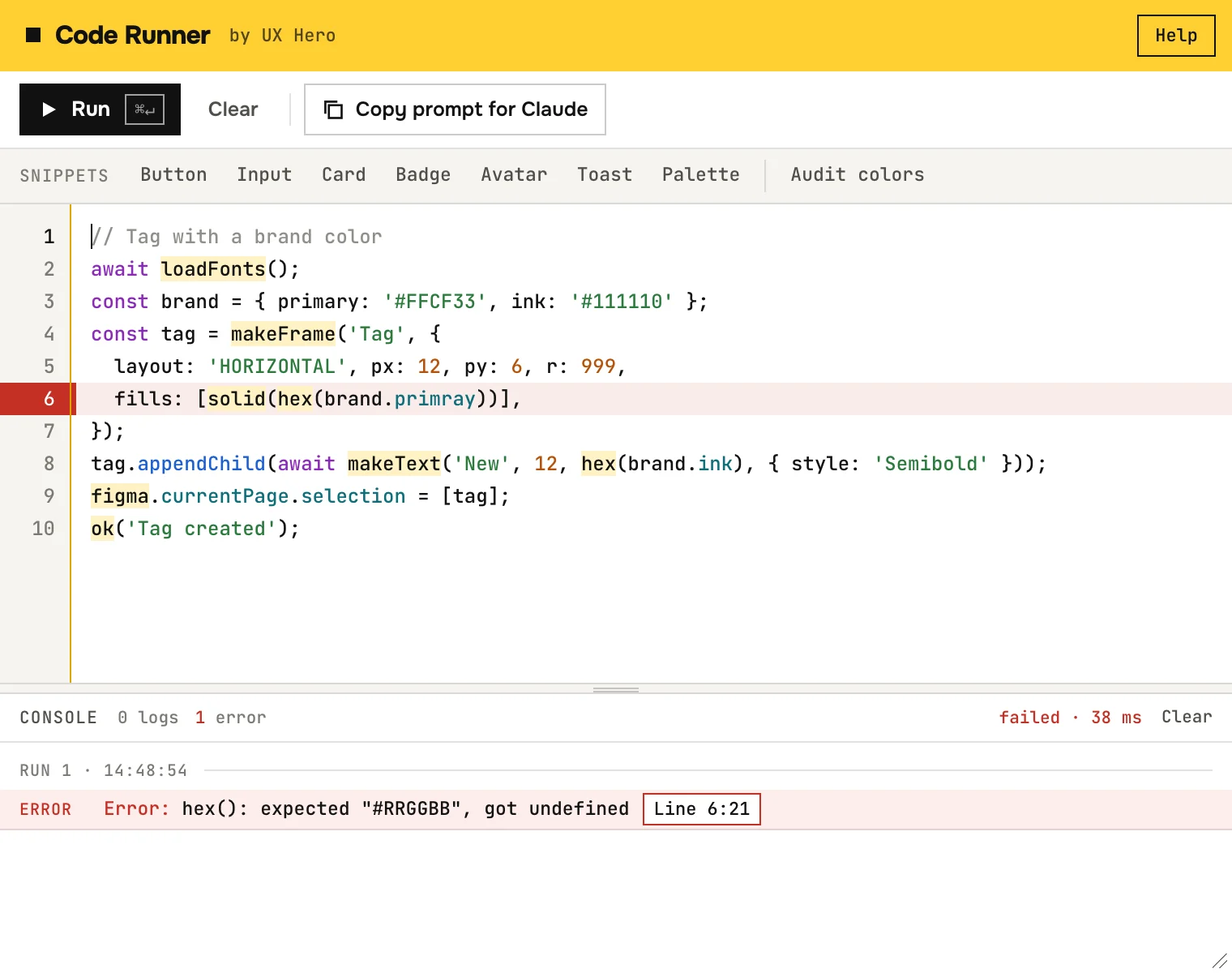
- Line 6:21Click to jump
The line lights up in the gutter and the editor.
- Inside helpers
A bad hex() call points to the line that called it.
- Syntax errors
Caught before the run, with line and column.
- Run selection
Select lines to run only them. Numbers still match the editor.
- A real console
log, info, warn, error and table. Nodes print as { type, name, id }, circular objects are safe.
Snippets
Eight scripts to start from.
One click loads a snippet into the editor. Read it, change a value, run it. They use only the async APIs that files with page loading require.
- 01
Button
3 types × 3 states as one set, label as a text property.
- 02
Input
Default, Focus, Error and Disabled with label and hint.
- 03
Card
Media, title, text and a link. Fixed width, hug height.
- 04
Badge
Five tones with a dot, as variants.
- 05
Avatar
Four sizes with initials, from 24 to 56 px.
- 06
Toast
Success and Error on ink, with a color bar and an action.
- 07
Palette
Every local color variable as a swatch bound to it.
- 08
Audit colors
Finds and selects nodes with hardcoded colors.
Code Runner is one script. The course is the whole system.
Course in Ukrainian · Design System + AI
Tokens from Figma, components with every state, Storybook and Claude that keeps the system in order. Self-paced, with a workbook.
See the courseNot ready for a course? Get new scripts and live streams in Telegram
Questions you'll have
FAQ.
Is it really free?
Yes. No limits, no account, no paid tier. The course is the paid product.
Does it work offline? Does it send anything anywhere?
It works offline. The plugin has no network access at all, so your code and your file stay in Figma. The only thing it stores is your last script, in Figma's local plugin storage on your computer.
Is it safe to run code?
The code runs in Figma's plugin sandbox with the same rights as any plugin: it can change the open file, and it can't reach the network or your disk. It can delete or move layers if you ask it to, so read scripts from other people (or from Claude) before you run them, and try new ones in a copy of the file.
Each run is one undo step, so one ⌘+Z on the canvas reverts it.
Does it work on Windows and in Figma in the browser?
Yes. Version 1 used SF Pro, which only exists on a Mac, so snippets failed elsewhere. Version 2 uses Inter, which every Figma has. Shortcuts use Ctrl instead of ⌘ on Windows.
Will my old v1 scripts still run?
Yes. Every helper kept its name and arguments, and every DS key is still there. The colors changed to a neutral palette and the font is Inter now. If you need SF Pro back, put setFont('SF Pro') at the top of the script.
Can I use my own tokens and fonts?
Yes. Bind real variables with bindFill(node, await v('color/bg')), or define your own const DS = { ... } at the top of the script and it replaces the built-in one. setFont('Your Family') switches the font.
JavaScript or TypeScript?
Plain JavaScript with async/await. Your code runs inside an async function, so top-level await and return work.
Who built this?
Dmytro Nikolaienko · Product Design Lead, 15 years in fintech and crypto, founder of UX Hero. Same person behind VooDoo Maker, the courses and the YouTube channel.
Ship faster
Stop clicking. Start scripting.
Free Figma plugin. Install in 30 seconds, first script in a minute.
Install Code Runner